Arm processor
What is an Arm processor?
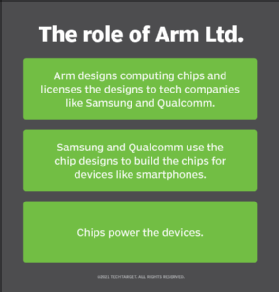
An Arm processor is one of a family of central processing units (CPUs) based on the reduced instruction set computer (RISC) architecture for computer processors. Arm Limited, the company behind the Arm processor, designs the core CPU components and licenses the intellectual property to partner organizations, which then build Arm-based chips according to their own requirements. Arm Limited does not manufacture or sell any chips directly.
Acorn Computers first developed the Arm processor in the 1980s. Until recently, the name Arm was treated as an acronym, ARM, which at first stood for Acorn RISC Machine and then for Advanced RISC Machine. The acronym is still widely used, although Arm Limited uses only Arm when describing its processor technology.
Arm Limited offers designs for both 32-bit and 64-bit RISC multicore processors. The processors use a much simpler instruction set than their Intel counterparts, which are based on the complex instruction set computing (CISC) architecture. The two types of processors also employ different methods to optimize performance and increase efficiency. For example, Intel takes a hardware approach to maximizing performance, whereas Arm takes a software approach.
Arm processors can execute many more millions of instructions per second than Intel processors. By stripping out unneeded instructions and optimizing pathways, an Arm processor can deliver outstanding performance while using much less energy than a CISC-based processor. The reduction in power also means that Arm CPUs generate less heat. That's not to say Arm processors are inherently better than Intel processors, only that they're better suited to specific use cases.
Arm processors are used extensively in consumer electronic devices such as smartphones, tablets, wearables and other mobile devices. They're also used in a wide range of sensors and internet of things devices. According to Arm Limited, the company's partners have shipped more than 215 billion Arm-based chips over the past three decades.
What are Arm processor features?
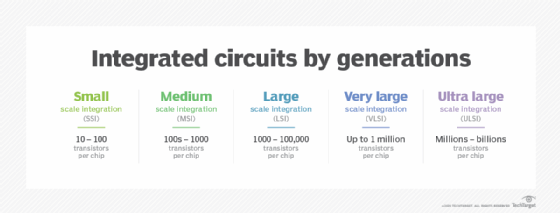
Because of their reduced instruction set, Arm processors require fewer transistors, resulting in a smaller die size for the integrated circuitry. Their smaller size, reduced complexity and lower power consumption make them suitable for increasingly miniaturized devices.
Arm processor features include the following:
- load/store architecture
- integrated security
- orthogonal instruction set
- single-cycle execution
- energy efficiency
- 64- and 32-bit execution states
- hardware virtualization support
The simplified design of Arm processors offers more efficient multicore processing and easier coding for developers. While they don't offer the same raw compute throughput as Intel CPUs, Arm processors sometimes exceed the performance of Intel processors for applications that exist on both architectures.
Arm extends its reach
In the past, Arm processors were limited primarily to smaller devices such as smartphones and sensors. But that has begun to change as Arm processors find their way into device types that have traditionally been the domain of Intel and, to a lesser degree, AMD. Microsoft, for example, offers Arm-based versions of its Surface computers, along with Windows editions that can run on Arm-based PCs.
Arm is also used in many Chromebook laptops, and Apple now offers a number of computers that use the Arm-based M1 chip. Apple's new MacBook Pro systems, which use the chip, have set a new industry standard for laptop performance and battery life.
The Arm processor is also moving into the server market. Although this is not a new effort, its adoption has been slow. But enterprises have started to take notice of the Arm architecture, in large part because of its promise to deliver the best performance-per-watt of any enterprise-class CPU.
As workloads increase in both size and complexity, they require more energy to process and to maintain safe operating temperatures for the underlying hardware. Not only is this a financial consideration, but it is also a concern for organizations moving toward more sustainable data centers.
A traditional x86-class server increases performance by scaling up the speed and sophistication of each CPU, using brute-force processing and power to handle demanding computing workloads. The CPUs are becoming much denser and faster so that more computing can be done in a smaller space. As a result, today's x86 servers are consuming more energy than ever and generating so much heat that traditional heating, ventilating and air conditioning systems can no longer keep up.
In comparison, an Arm server might use hundreds of smaller, less sophisticated, low-power processors that share processing tasks instead of relying on just a few higher-capacity processors. This approach is sometimes referred to as scaling out, in contrast to scaling up the x86-based processors. However, even when scaled out, the processors consume less energy and generate less heat than the x86 servers, making them a potential solution for helping to address future energy concerns.
Although Arm-based servers represent only a fraction of today's data center systems, they have been making steady inroads. Amazon, for example, recently announced the third generation of its Arm-based AWS Graviton processors, which promise up to 25% better compute performance than the AWS Graviton2 processors and twice the cryptographic workload performance. The Graviton3 chips now power the AWS EC2 C7g instances.
Ampere recently unveiled the first 80-core Arm-based 64-bit server processor, which targets workloads such as artificial intelligence, data analytics, web hosting and cloud-native applications. Arm-based processors are also being used in some of the world's fastest supercomputers and are gaining increasing recognition as a result. In the meantime, Arm Limited continues with its own efforts to march into the data center. Its Neoverse chips, for example, promise the performance and energy efficiency needed to support cloud, edge and 5G workloads now and into the foreseeable future.