Understanding the difference between thin and thick clients
How do thin and thick clients compare for licensing or flexibility? These two endpoint types each have their role in the enterprise, but they fit into organizations in very different ways.
Managing and delivering virtual desktops is a significant task for IT administrators to take on, but sometimes the endpoint accessing the virtual desktop can go a long way to ensure a positive user experience.
One key decision surrounding virtual desktop delivery is whether end users access their resources via a thin client or a PC running thin client software. Both types of endpoints have their benefits and drawbacks, so IT admins and executives should be sure they know the pros and cons of using both thin and thick clients.
Differences between thin clients and thick clients
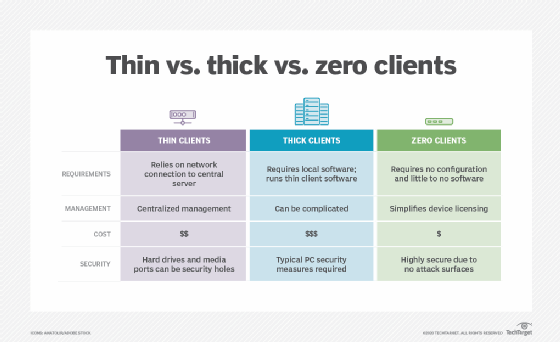
Thin clients and thick clients -- sometimes referred to as fat clients -- differ across numerous categories, such as hardware cost, licensing and maintenance. Each organization will have different needs and preferences regarding which functions are most important.
Security
One of the primary benefits of using thin client hardware compared to thick client hardware is security. Thin client devices almost always lack an internal hard drive and removable media ports, which means users can't copy data from within the network to removable media. Likewise, users are unable to install unauthorized software from their network connection. Because thin client machines typically do not have a hard drive, there is little to no risk of viral infections.
Initial deployment costs are a major consideration for some organizations. While it is true that thin client hardware typically has a very low price tag, the cost of deploying thin clients may be much higher than that of deploying PCs. For example, organizations that already own PCs can reuse them, which will cut down significantly on hardware costs. At the same time, organizations that start from scratch will see lower costs with thin client hardware. Some thin client devices cost as little as $300 or less out of the box. Organizations can opt for even greater savings if they purchase refurbished devices, but this may not be worth the hassle from a support perspective.
Software licensing costs
Thin client hardware is usually less expensive from a licensing perspective because a desktop PC acting as a thin client runs thin client software on top of a traditional OS. This means that IT admins may need to license two separate OSes for each PC: the OS running locally on the PC's hard drive and the OS running in a VDI environment. On top of that, there may be licensing costs associated with the thin client software running on the PCs. IT departments could also use a stripped-down OS, such as Windows 10 IoT.
Maintenance costs
One of the big selling points of thin client hardware is that it reduces maintenance costs. While this is true, it's still possible to spend less with PCs.
Thin client devices are essentially proprietary PCs that only have their most basic components in place. As such, IT doesn't have to perform much maintenance. There are almost no moving parts, so thin client devices also tend to last a long time. However, when a problem does occur, there might be nothing that admins can do to fix it. IT may have to replace the device. But, keep in mind that a PC with technical problems has an easier route for maintenance. Admins can replace the failed component for much less than the cost of replacing an entire thin client device.
It's clear that thin client devices tend to have more advantages than PCs in virtual desktop environments, but the flexibility of PCs in a business environment could make up for all of these disadvantages.
Of course, this is only taking hardware maintenance into account. PCs need consistent maintenance at the software level. For example, IT must patch the PC OSes and other components, such as antivirus, regularly.
Power consumption
Comparing thin and thick clients for power consumption is another boon for thin client devices, which tend to consume much less power than PCs. Of course, power consumption varies among makes and models, but organizations can count on thin clients generally being far more energy-efficient if that's a concern for organizations.
Flexibility
Flexibility is the category that PCs finally make up some ground. It's clear that thin client devices tend to have more advantages than PCs in virtual desktop environments, but the flexibility of PCs in a business environment could make up for all of these disadvantages.
For example, consider an organization that goes through a corporate buyout. The organization already has a VDI platform in place, but the organization that completed the acquisition uses mainframes. Because some users have to connect to the VDI environment and the mainframe, it is necessary to replace the existing thin client hardware with PCs. One option is to link the PCs' network cards to the VDI environment while a secondary network card links to a mainframe Gateway. Users could then run a dual monitor configuration with one screen displaying the VDI session and the other showing the mainframe session.
This functionality and level of flexibility are not possible without dedicated thin client hardware and is just one scenario showcasing how the flexibility of PCs helps organizations.