remote desktop protocol (RDP)
What is remote desktop protocol (RDP)?
Remote desktop protocol (RDP) is a secure network communications protocol developed by Microsoft. It enables network administrators to remotely diagnose problems that individual users encounter and gives users remote access to their physical work desktop computers.
RDP can be used by employees working from home or traveling who need access to their work computers. RDP is also often used by support technicians who need to diagnose and repair a user's system remotely and by admins providing system maintenance.
To use a remote desktop session, a user or admin must employ RDP client software to connect to the remote Windows PC or server running RDP server software. A graphical user interface enables the remote user or admin to open applications and edit files as if they were sitting in front of their desktop.
RDP clients are available for most versions of Windows as well as for macOS, Linux, Unix, Google Android and Apple iOS. An open source version is also available. RDP is an extension of the International Telecommunications Union-Telecommunication (ITU-T) T.128 application sharing protocol.
This article is part of
What is desktop management and how does it work?
Features of RDP
RDP is a secure, interoperable protocol that creates secure connections between clients, servers and virtual machines. RDP works across different Windows OSes and devices and provides strong physical security through remote data storage.
Noteworthy properties of RDP include the following:
- smart card authentication;
- bandwidthreduction;
- the ability to use multiple displays;
- the ability to disconnect temporarily without logging off;
- RemoteFXvirtualized GPU (graphics processing unit) support;
- 128-bit encryption for mouse and keyboard data using RC4 encryption;
- directs audio from a remote desktop to the user's computer;
- redirects local files to a remote desktop;
- local printers can be used in remote desktop sessions;
- applications in the remote desktop session can access local ports;
- shares clipboard between local and remote computers;
- applications on a remote desktop can be run on a local computer;
- supports Transport Layer Security;
- improvements to RemoteApp; and
- RDP can support up to 64,000 independent channels for data transmission. Data can be encrypted using 128-bit keys. The bandwidth reduction feature optimizes the data transfer rate in low-speed connections.
It is worth noting that not every RDP client supports all of these features. Additionally, a client might only support certain features when operating in enhanced session mode.
RDP use cases
There are three main use cases for RDP. These include the following:
- remote troubleshooting (either by a corporate help desk or by an individual who is trying to assist someone they know);
- remote desktop access (such as being able to access a home or office PC while traveling); and
- remote administration (being able to make remote configuration changes on network servers).
How does remote desktop protocol work?
RDP provides remote access through a dedicated network channel. An RDP-enabled application or service packages the data to be transmitted, and the Microsoft Communications Service directs the data to an RDP channel. From there, the OS encrypts the RDP data and adds it to a frame so that it can be transmitted.
The Terminal Server Device Redirector Driver handles all RDP activity. This kernel driver comprises subcomponents such as the RDP driver, which handles user interfaces, transfers, encryption, compression and framing. The transport driver is responsible for packaging the protocol sent across a TCP/IP network.
What are the benefits of RDP?
- Data can be securely stored and encrypted using cloud servers, reducing the risk of data loss through breaches or device failure.
- It does not require the use of a virtual private network.
- It enables employees at companies with legacy on-premises IT infrastructure to work remotely.
What are the issues with RDP?
- There can be potential latency issues for remote employees if they have a slow internet connection.
- Security vulnerabilities, such as susceptibility to hash attacks and computer worms, make it not ideal for sustained use over time.
- Overall, RDP can be useful for administering remote work management and access, especially for companies using an on-premises IT infrastructure.
RDP security concerns
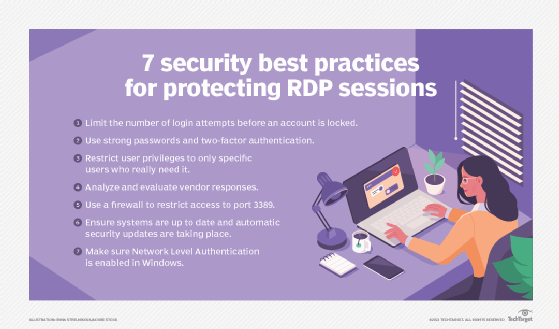
It is important to follow RDP best practices when running RDP -- such as not using open RDP connections over the internet or giving anyone direct access to an RDP server. Other precautions include defense-in-depth, which uses multiple layers of security, and the principle of least privilege, which limits user access to only the systems needed.
The BlueKeep security flaw affected users of earlier versions of Windows by installing malicious programming and making changes to data. First discovered in May 2019, these vulnerabilities affected Windows 7, Windows XP, Windows 2000, Windows Server 2003 and Windows Server 2008. Historically, RDP has been susceptible to pass the hash attacks and computer worms. Though less effective, brute force attacks have gained access to past and present versions of RDP.
Microsoft provided security patches for those earlier Windows versions, and newer versions of RDP are far more secure. More recent Windows OSes contain a mechanism for specifying which users are allowed to access the system through an RDP session. There is also an option to prevent anyone from remotely accessing the system unless they use network-level authentication.
RDP vs. VPN
Although some people compare RDP and VPN, the two technologies are significantly different. A virtual private network provides a network path to an organization's network resources. A remote user who has a VPN connection could work the same way they would be able to if they were working on premises.
Where a VPN provides connectivity to a remote network, RDP provides connectivity to a specific remote resource. This resource is usually a physical or a virtual computer, but some solutions allow RDP connections to specific remote applications.
Alternatives to RDP
RDP is one of the most widely used remote access protocols, but alternatives exist.
For screen-sharing and remote control, one option is Screens from Edovia. Screens can remotely control macOS or iOS systems from anywhere in the world. The company also makes a product called Screens Connect that makes Mac and Windows systems remotely accessible, while the Screens Express utility allows users to grant someone else temporary access to their Mac. Zoho Assist is primarily designed to provide remote support but can also offer unattended remote access. Zoho Assist is a paid product, but the company also provides a lightweight free edition.
It's important to keep in mind that not all VDI software supports all display protocols, so choosing a protocol often depends on what VDI software the organization is using. If the goal is to find an alternative to connect users to a remote or virtual desktop, popular options include Citrix HDX, PC over IP and VMware Blast Extreme.
Numerous security threats are associated with RDP, including computer worms and ransomware attacks. Learn how ransomware affects organizations and the real-life consequences of these attacks.