virtual desktop
What is a virtual desktop?
A virtual desktop is a computer operating system that does not run directly on the endpoint hardware from which a user accesses it.
Virtual desktops are accessible through client software installed directly on an endpoint, which presents the desktop to the user and allows them to interact with it using a keyboard, mouse, touchscreen and peripherals. Virtual desktop clients are available for a wide variety of devices, including PCs, tablets, smartphones and Raspberry Pi.
The three major virtual desktop providers are Citrix, Microsoft and VMware. Many other vendors offer products and services to help IT professionals deploy, manage, secure and optimize virtual desktops.
Types of virtual desktops
Virtual desktops often rely on virtualization software, which abstracts operating systems, applications and data from a computing device's underlying hardware. In this scenario, a desktop operating system runs inside a virtual machine (VM) that may be installed on a server -- either on premises or in the cloud -- or on a PC. The main use case for running a VM directly on a PC is to create multiple desktops.
The technology that allows organizations to run desktop operating systems on VMs on on-premises servers is known as virtual desktop infrastructure (VDI). Offerings that do the same, but in the cloud, are known as desktop as a service (DaaS).
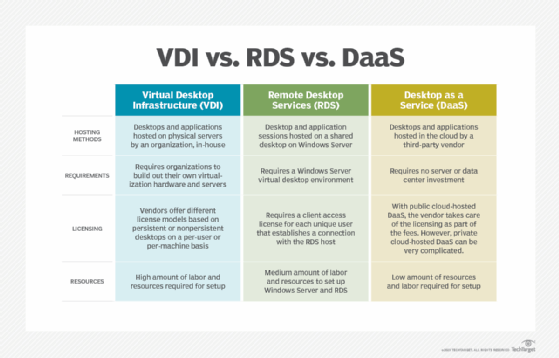
Another example of virtual desktop technology is Microsoft Remote Desktop Services (RDS), which allows multiple users to share a single Windows Server operating system instance. RDS does not rely on virtualization software; instead, the OS is installed directly on a server, and a remote display protocol presents components of the OS to the endpoint device.
An operating system installed directly on one PC and accessed on another endpoint device over a network is also considered a virtual desktop.
Persistent desktops
There are two ways to approach VDI: with persistent desktops or nonpersistent desktops. A persistent desktop, also known as a dedicated desktop, is a unique operating system image created and kept for each user.
A persistent desktop maintains user settings and data so that each time a user logs in, all of their applications, customizations, shortcuts and files appear. Because persistent desktops require more storage, backup and other infrastructure and administrative resources, many VDI deployments use nonpersistent desktops or a mix of both.
Nonpersistent desktops
In contrast, nonpersistent desktops, also called stateless desktops, do not retain personal information.
Each time a user logs in, he gets a fresh, generic virtual desktop from a golden image that all users share. At the end of each session, the desktop reverts back to its original state.
The primary benefit of the nonpersistent desktop approach is that it requires less storage.
Benefits of virtual desktops
A virtual desktop is secure and isolated, which is the biggest benefit of the technology. All data stored on a virtual desktop actually lives on a server or in the cloud, not on the endpoint itself, which dramatically reduces the threat associated with lost or stolen devices.
Isolation also makes virtual desktops ideal for application testing. Developers often use virtualization to run multiple desktops on the same endpoint, specifically for this purpose. That way, if a code change causes an application or entire operating system to crash, or there are other unintended consequences, it will not affect the developer's primary desktop or the production environment at large.
Other benefits of virtual desktops vary depending on the technologies used.
VDI, DaaS and RDS present an opportunity for organizations to save money on endpoint hardware costs. Most of the processing power required to run virtual desktops in these scenarios happens in a data center or in the cloud, so it's not necessary to buy high-performance PCs. The costs of deploying, maintaining and licensing virtual desktops may outweigh this benefit, however.